The Poppy Field Guide
By Second Nature Computing
Product
Less phone, more day.
We started Second Nature Computing on a hunch. The way most software works today - sitting there, waiting for us to ask - is not the way the best of it should work tomorrow.
Phones know an enormous amount: where you are, what is on your calendar, who you have been talking to, what you care about, what time of day it is, what the weather is doing. Almost none of that knowledge becomes useful unless you go fetch it. You open the app. You search the inbox. You check the forecast. The device is patient, but not helpful.
We think this can change. We are an applied AI lab, working on what we call proactive intelligence - the idea that our devices and the apps on them can anticipate what we need and bring it forward at the right time and place. Not as a chat. Not as a search bar. As a layer that lives quietly underneath everything we already use.
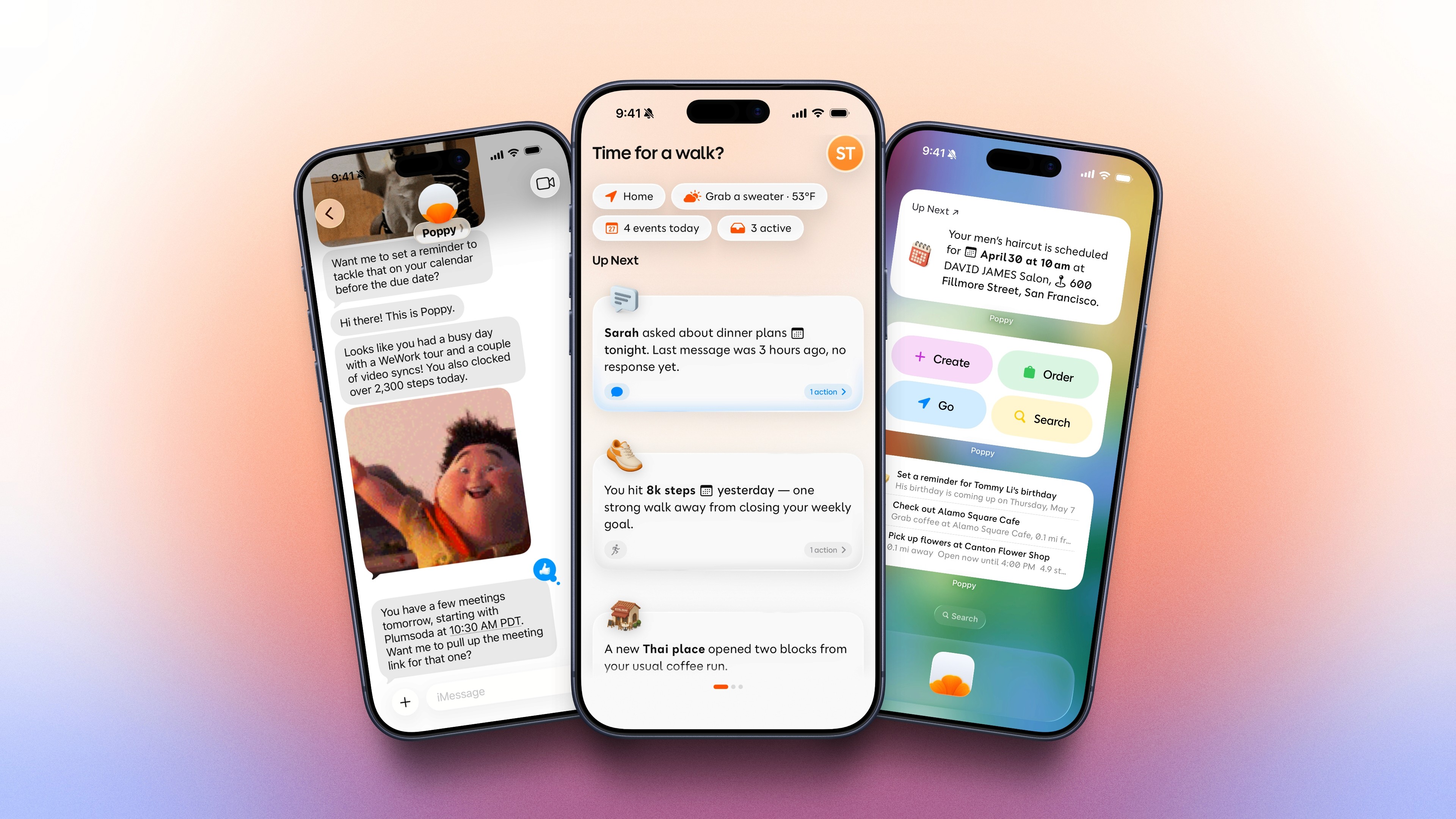
Poppy is our first product: a daily companion app for iOS that brings your calendar, email, messages, health, and the services you already use into one quick look, then lets you act on them in a few taps or one text.
This field guide explains how Poppy thinks, what it does, and what it does not. We are shipping in Open Beta because we would rather build with the people who will use it than build in private.
What Poppy is not: not a chatbot with a blank text box waiting for a query. Not a search engine waiting to be asked. Not a notification firehose. Poppy reduces the things competing for your attention.
Less phone, more day - the philosophy
Six apps before coffee. Calendar, to see what is coming. Mail, to see what spilled in overnight. Slack, in case the team needed something. Weather, to decide what to wear. Messages, to answer the friend you did not answer yesterday. To-do, to remember what today is supposed to be about.
Six apps. Six different shapes of information. Six small, unrelated decisions about what to do next. By the time the coffee is ready, the day has already started moving past you.
This is the problem most software has decided is yours to solve. Phones store the day; you assemble it. Poppy starts from the other end. What if the phone showed you the day, instead of making you fetch it?
Your day, in one quick look
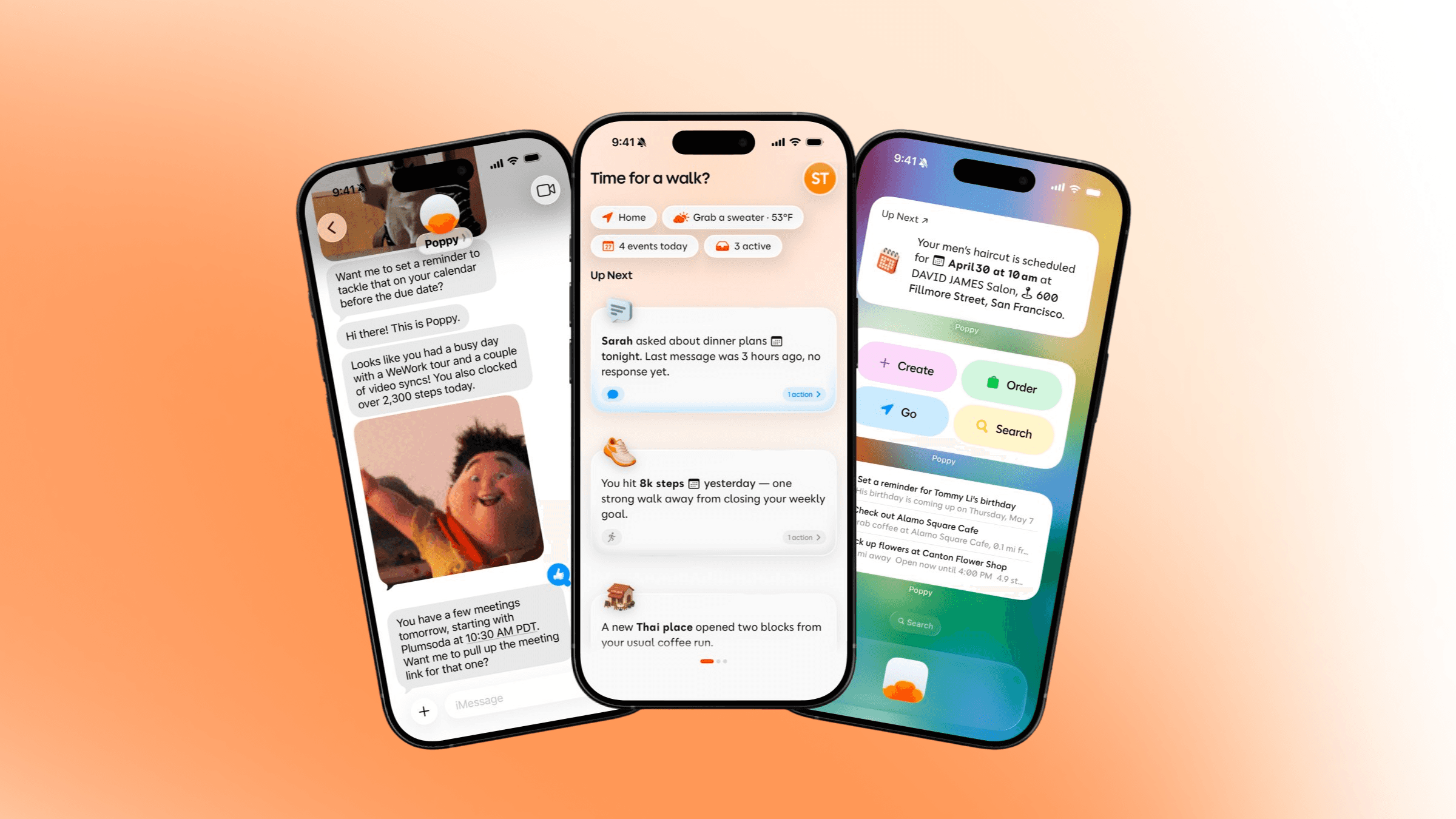
A morning, then. It is Tuesday. Your 9 AM moved to 8:30 - twelve minutes of warning. Rain is coming in around lunch; you were going to walk. There is an email from David that has been sitting since yesterday. Poppy puts all three on one screen: the calendar shift, the weather, and the email, with a draft reply already shaped from the thread.
Poppy is not trying to be the place where everything happens. Your calendar still lives in the calendar. Your messages still live in Messages. Your email still lives in your inbox. What changes is that you do not have to visit each of them at 7:45 AM to know whether the day is going to behave.
What Poppy helps with
Poppy is easiest to understand through the moments it makes lighter: seeing what matters first, acting without opening five apps, and keeping small routines from turning into repeated work.
The app has a few main surfaces. Briefings collect the most relevant parts of the day into readable cards. Shortcuts help you act on those cards without digging through apps. Magic Cue opens the right destination from the Action Button or Control Center. Smart Reminders keep recurring checks moving in the background. Memories make Poppy more personal over time, while staying visible and editable.
That is the product in practice: a calmer layer over the apps and services you already use, with confirmation before sensitive actions.
Three principles
Three rules govern every interaction Poppy has with you.
Single Most Important Thing. The home screen does not list everything you have on. It surfaces the one thing - sometimes two, occasionally three - that matters most right now. A briefing of one item is more useful than a list of twelve.
Context Transparency. Every Poppy suggestion shows its work. Tap a Briefing and you see why it surfaced - the calendar event, the email it pulled the address from, the weather window it noticed. No black boxes.
Calmer Computing. Poppy reaches you through whichever surface fits the moment, in order of how little it asks of you. A widget first, the app second, a text third, a call last. Least intrusive wins. You can mute any channel from your Profile.
What Poppy connects with
Every connection is opt-in and arrives with a short prompt explaining what Poppy will and will not do with access. Most connected services can be disconnected from Profile; full account deletion removes the full account context.
The integrations live in two layers: services Poppy works with directly, and apps Poppy can hand you off to when they fit the moment.
Calendar: Apple Calendar, Google Calendar
Email: Gmail, Outlook, iCloud Mail
Messaging: iMessage, WhatsApp
Work: Google Workspace, Google Contacts, YouTube, and Outlook-connected services
Health & Activity: Apple Health, Fitness, Nutrition, Sleep, Apple Music, Spotify, Strava
iOS: Reminders, Contacts, Location, Notifications, Home, Photos, Wallet, Alarms
Magic Cue Partners: Apple Maps, Google Maps, Waze, Uber, Lyft, Waymo, Zoom, Teams, Webex, Slack, Apple Music, YouTube Music, Spotify, Venmo, PayPal, Instacart, OpenTable, Resy, DoorDash, Ticketmaster, major airlines, hotels, Airbnb, Fitness, Nike Run Club, and more
The direct connections help Poppy understand the shape of the day. Magic Cue partners are different: Poppy does not need to pull data from inside every partner app. It opens the right one at the right moment, with the right destination or action queued when possible.
You can skip anything. Coming Up still works with calendar alone. Adding email and messages widens the picture; adding Health, Reminders, and other contexts widens it further.
Briefings
Coming Up is the home tab of Poppy - the single most important screen in the product. A short greeting at the top, then a row of status pills that hold the frame of the day in one glance: where you are, the weather and a simple clothing cue, the number of events on the calendar, and the active items Poppy is keeping an eye on.
Below the pills sits a stack of Briefings: natural-language cards summarizing single things happening today, each one a sentence rather than a field row. Tap any Briefing and Poppy shows what triggered it - the event, the email, the weather window, the memory it drew from.
Suggested For You & Shortcuts
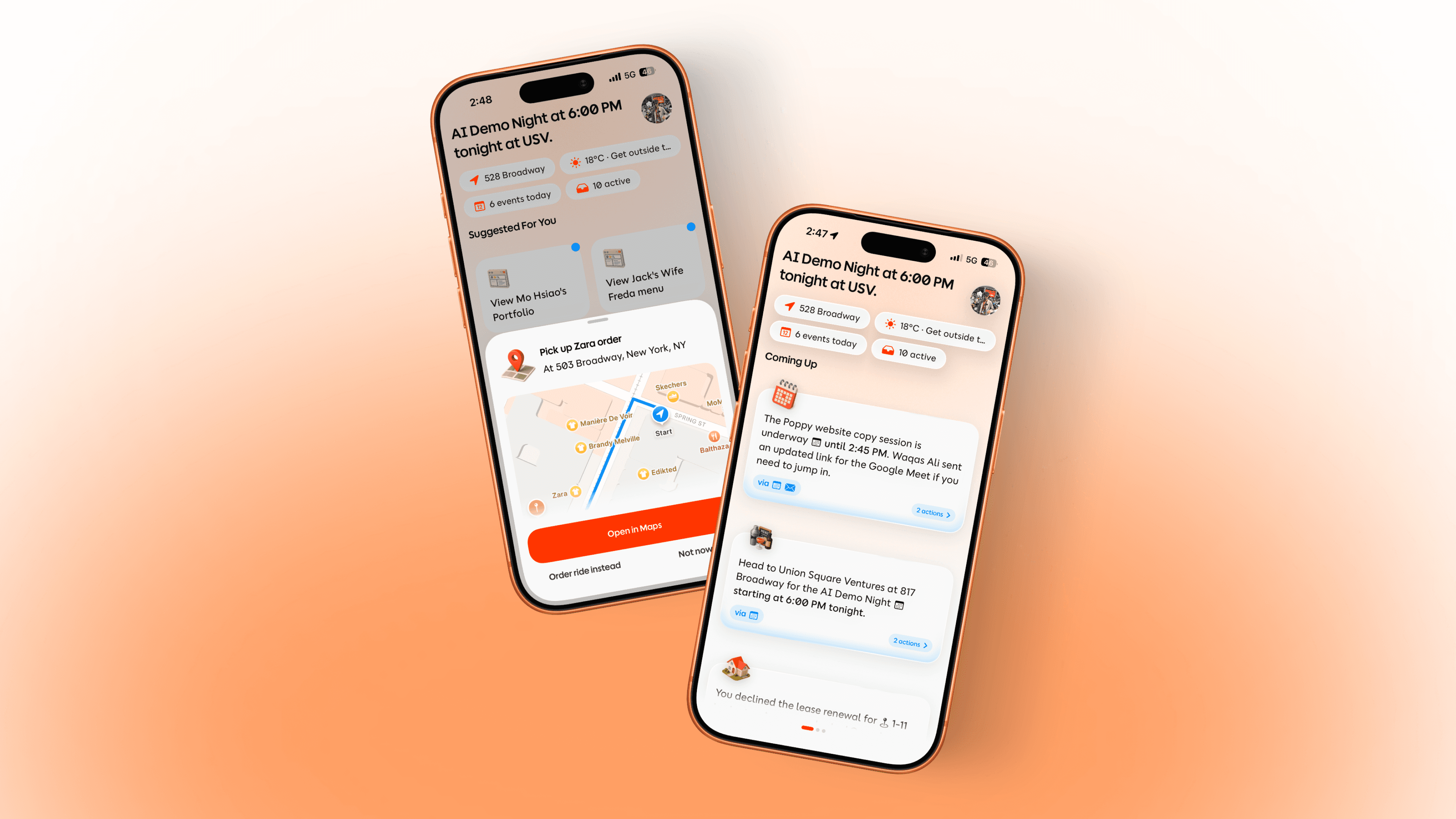
Where Coming Up shows you the day, Suggested For You lets you act on it. Next to the briefings sits a horizontal row of Shortcuts - single-tap actions Poppy has chosen for the moment, drawn from a library of action types across communication, calendar, reminders, navigation, health, smart home, commerce, media, timers, and the web.
The row moves with the day - morning shortcuts give way to midday, midday to evening. When an action has consequences, the card shows the draft, booking, route, or handoff before anything moves forward.
When your hands are not free, hold the Poppy widget or floating button and talk instead. "Text Ana I am running late." "What is on my calendar after lunch?" "Start a 20-minute timer." Push to Talk reaches into the same library by voice.
Actions Poppy can take
Shortcuts are where Poppy turns context into motion.
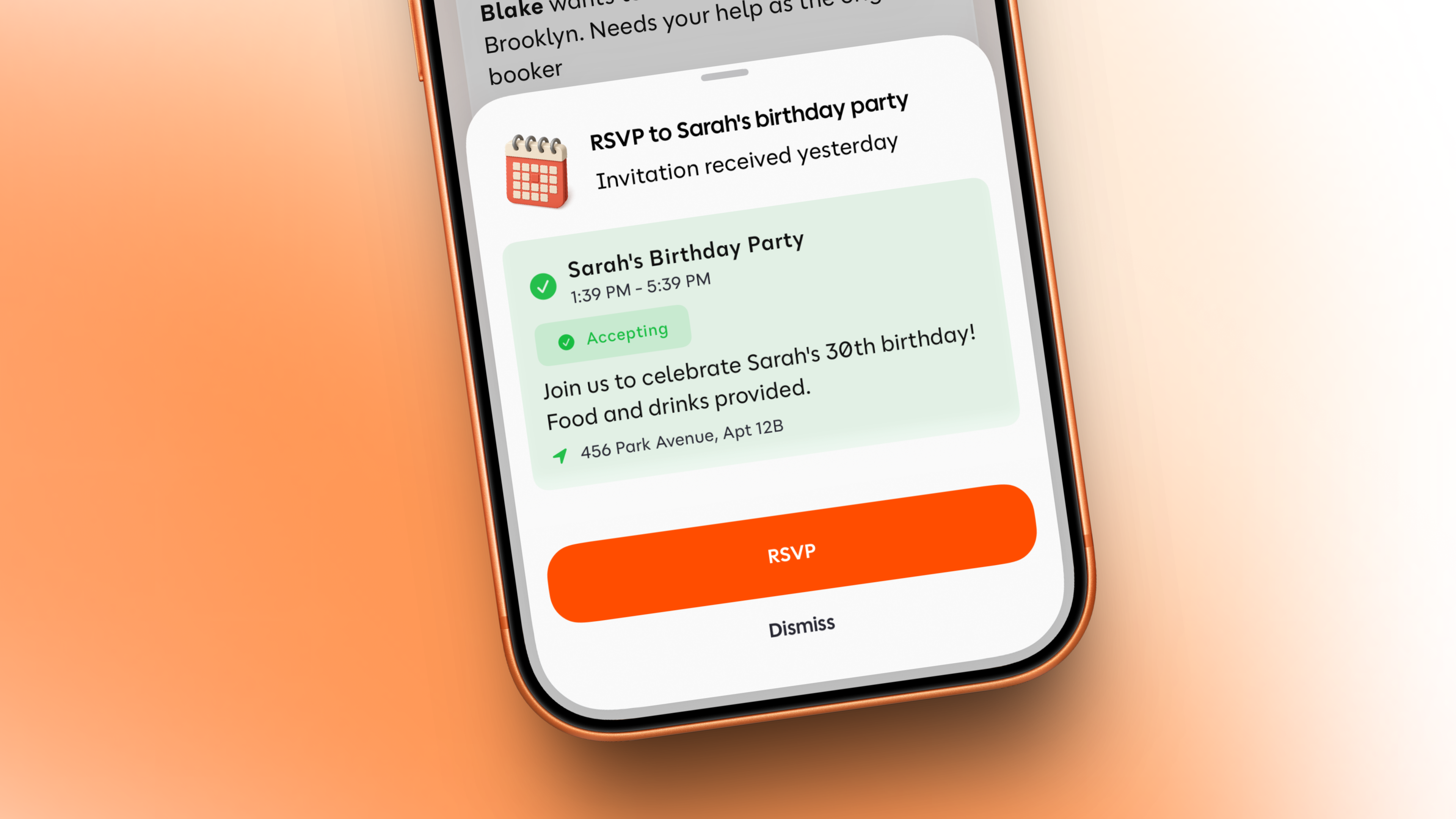
A briefing might tell you what changed. A Shortcut helps you do something about it: RSVP to an invite, draft the reply, get a ride, order the groceries, book the table, or turn a loose thought into a reminder.
Poppy proposes, you confirm.
For anything sensitive - a message sent, an event created, a ride requested, a booking opened, or an order started - Poppy prepares the action and waits for your tap.
Calendar
Poppy can help with calendar moments that need a decision. It can prepare a new event, surface an RSVP, or help remove something outdated.
Email and messages
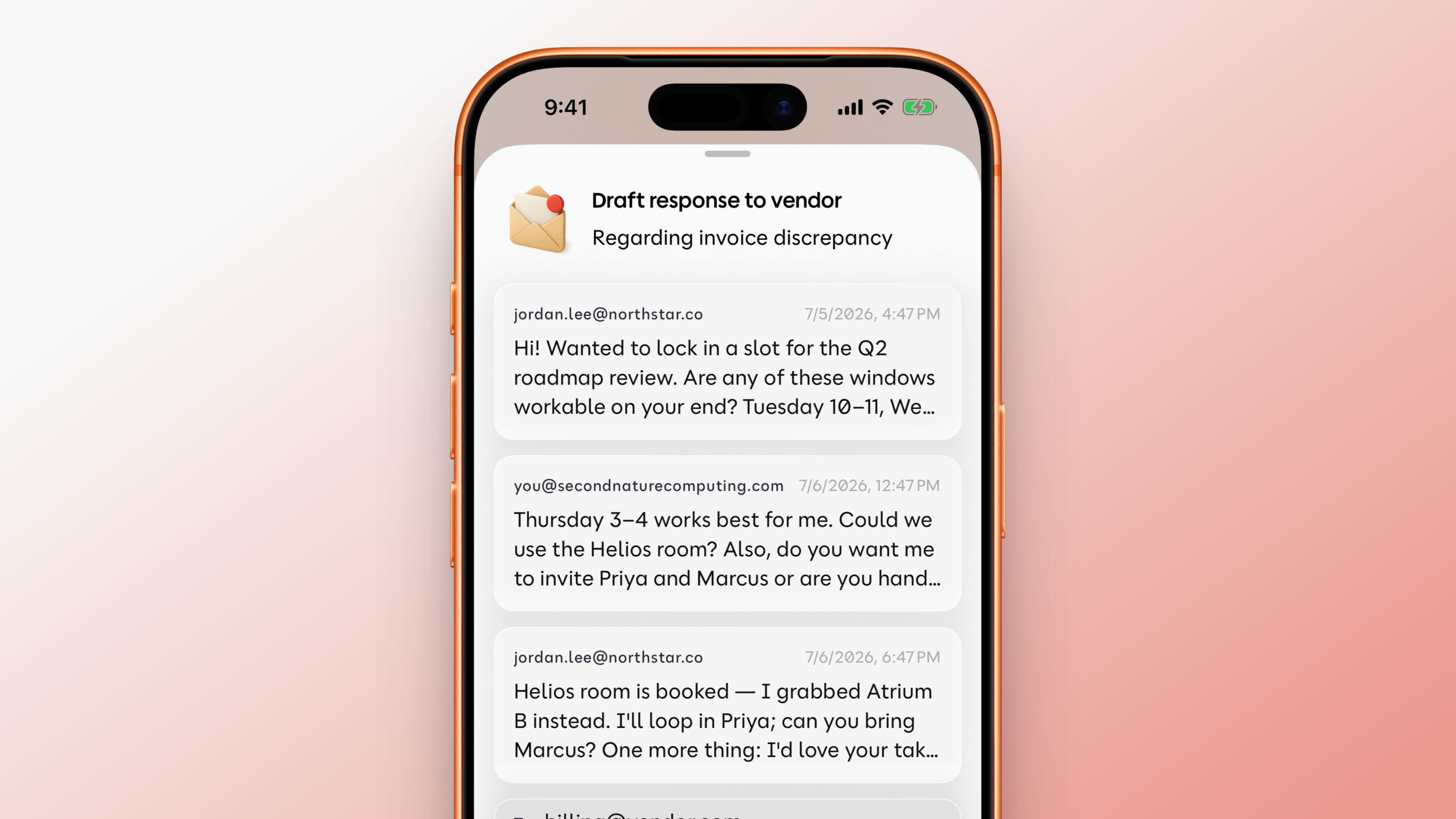
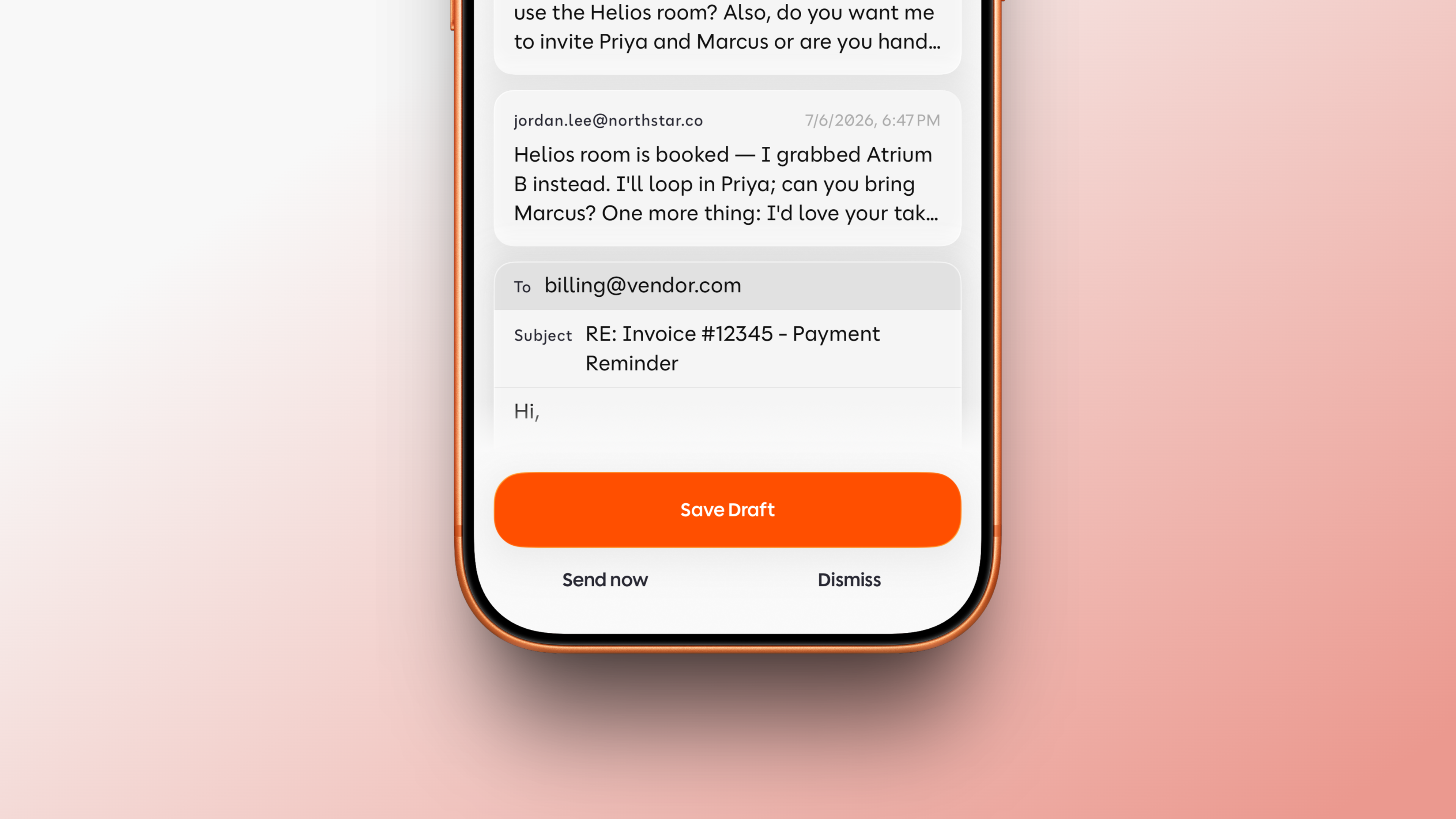
When your email is connected, Poppy can help draft or prepare replies from context. Communication actions can also include messages, calls, and FaceTime, but Poppy proposes first so you stay in control.
Directions, nearby search, and rides
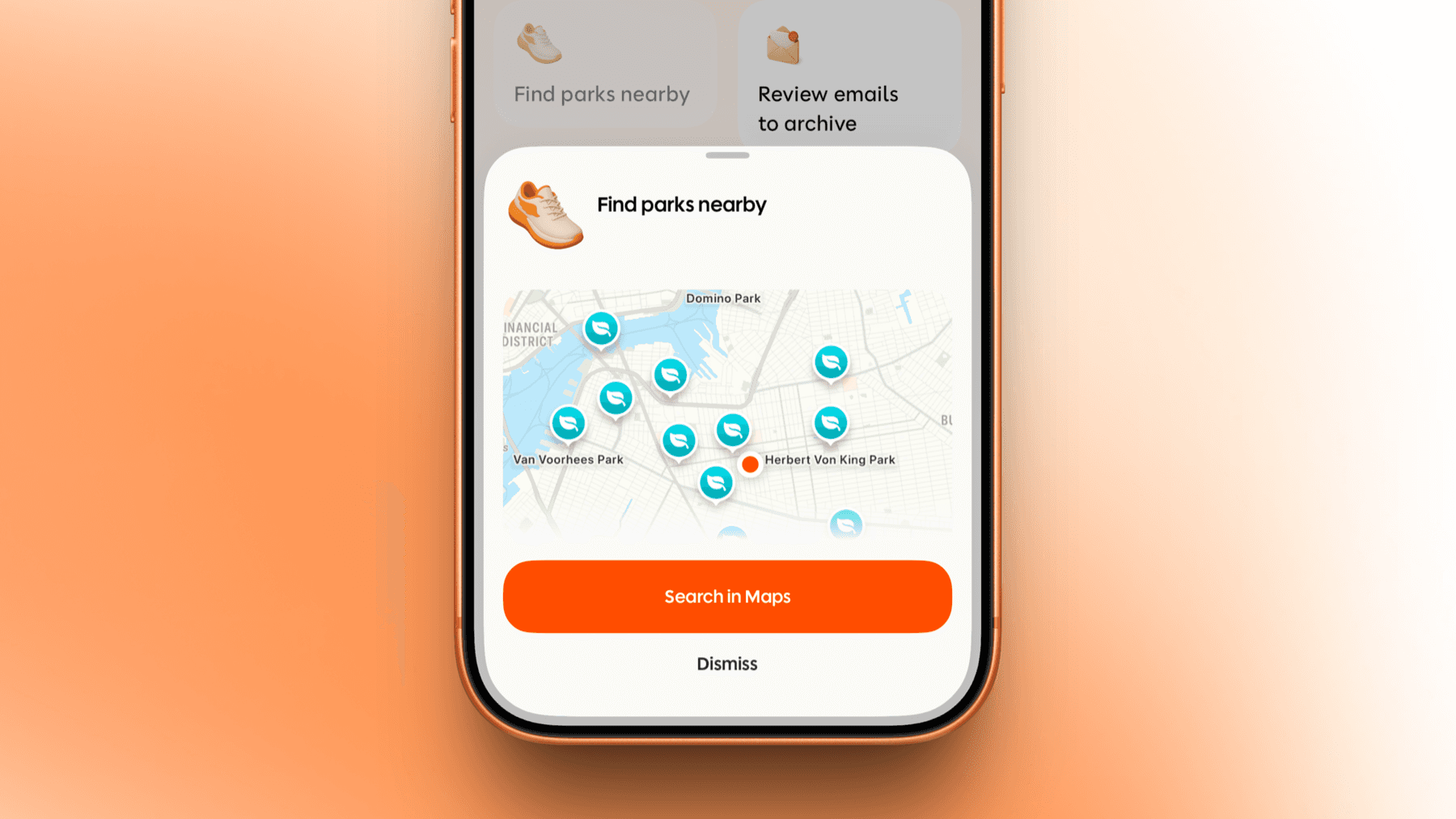
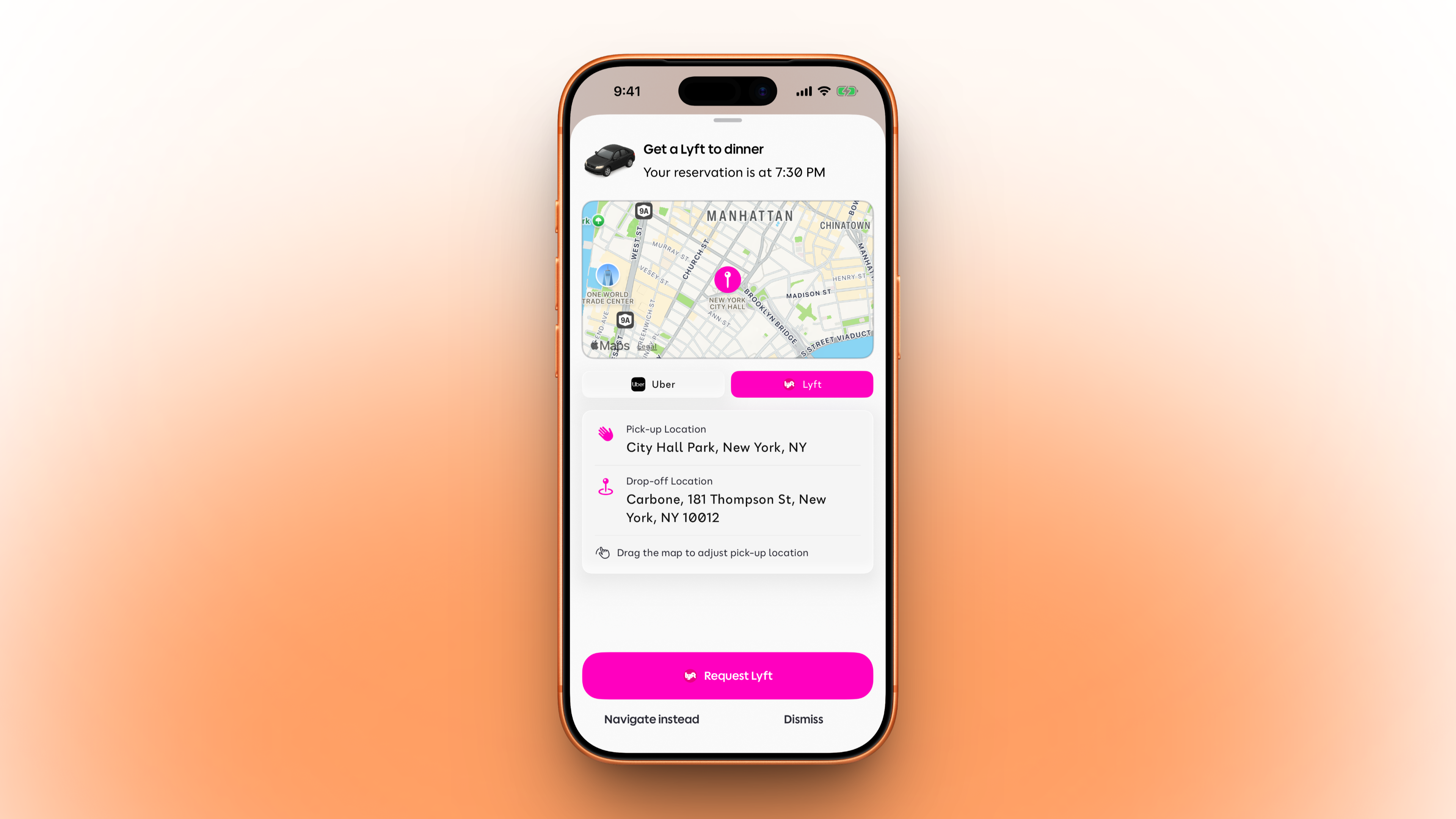
Poppy can help with lightweight location actions too: finding nearby places, opening directions, or handing off to Uber, Lyft, or Maps when the next step is getting somewhere.
Food and plans
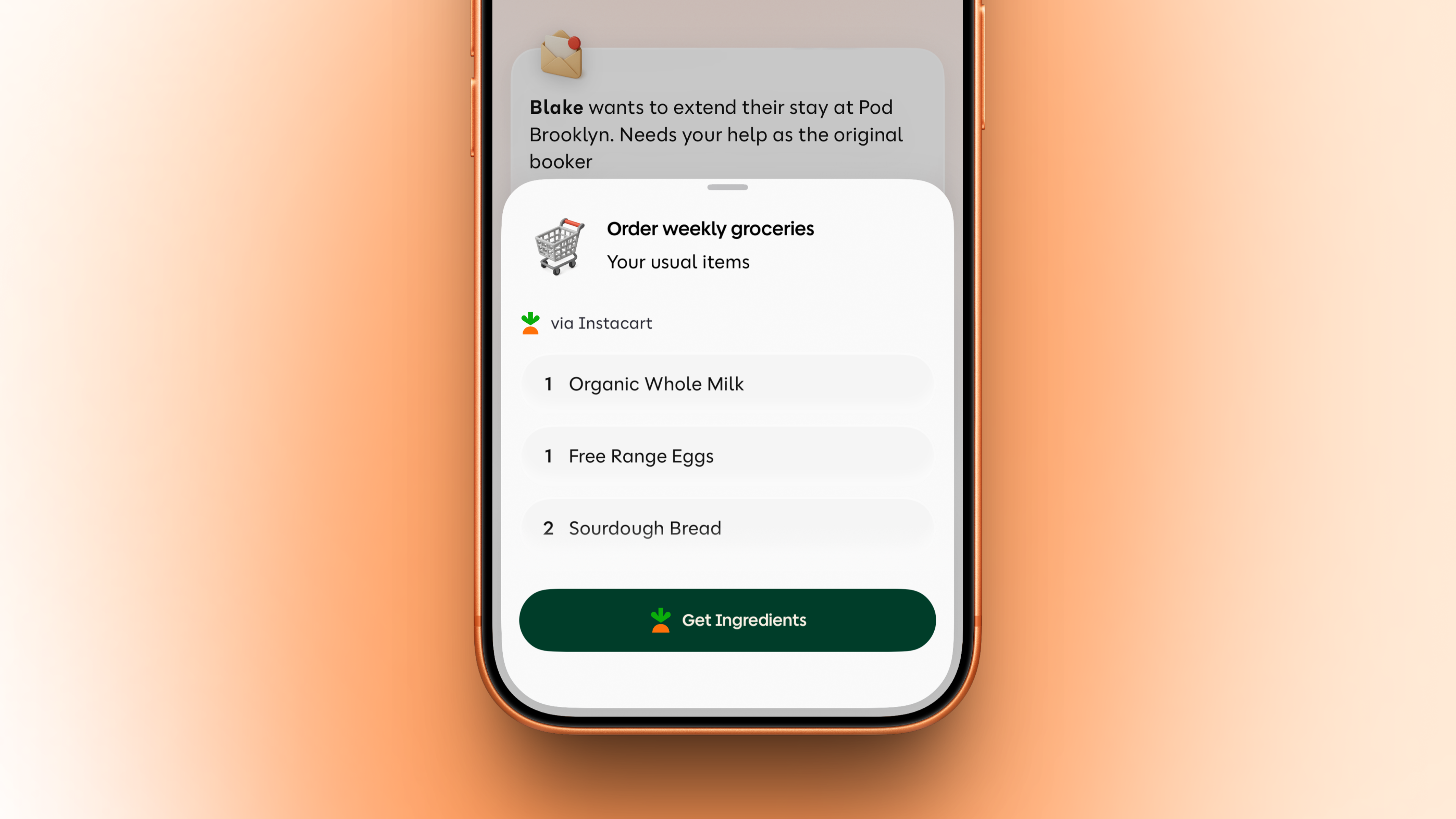
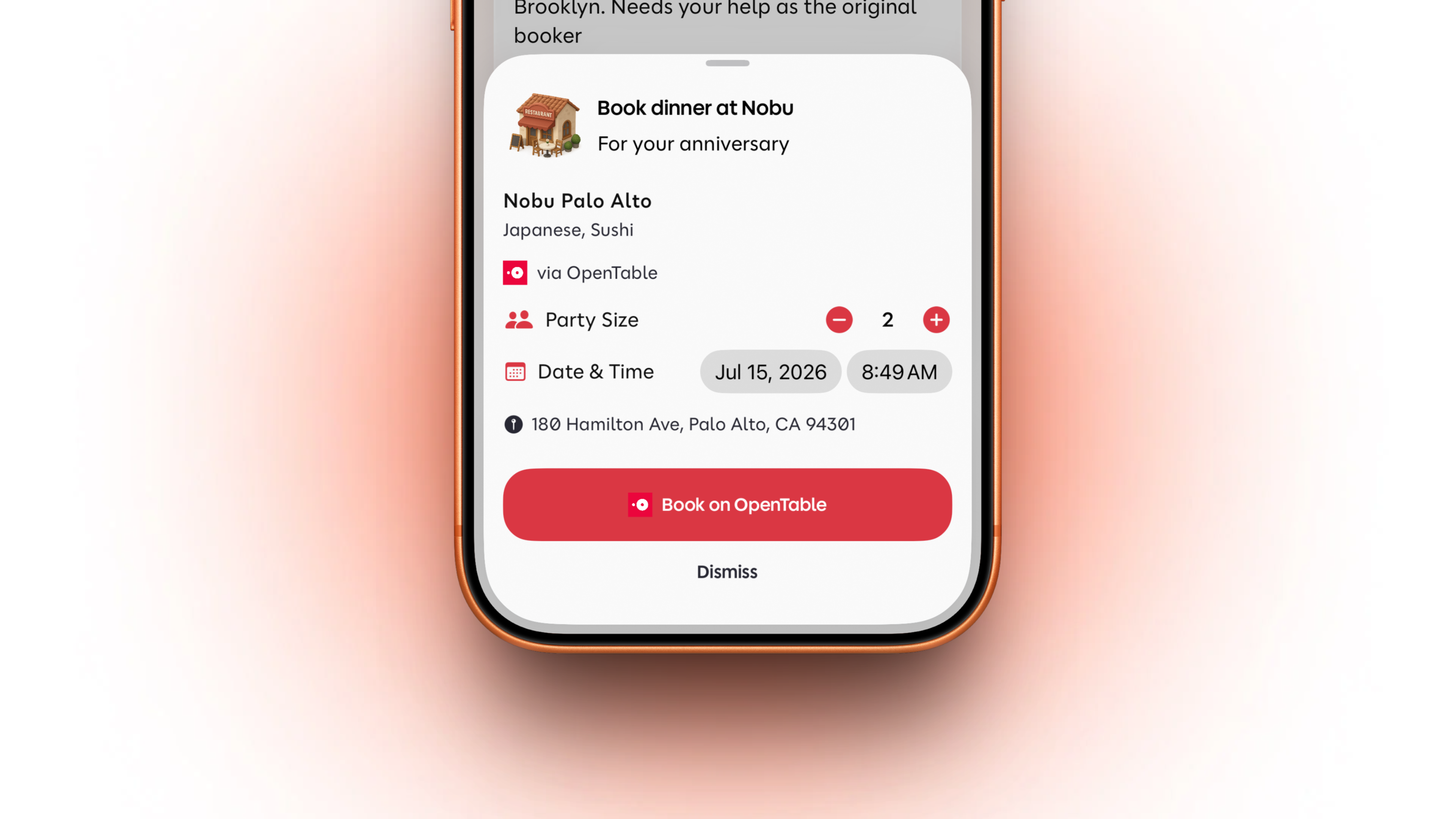
Poppy can prepare an Instacart flow from a grocery list or recipe ingredients, so the next step is closer than another search. If dinner becomes a plan, Poppy can also prepare the booking flow through OpenTable or Resy, with the place, party size, date, and time already shaped.
Reminders and follow-through
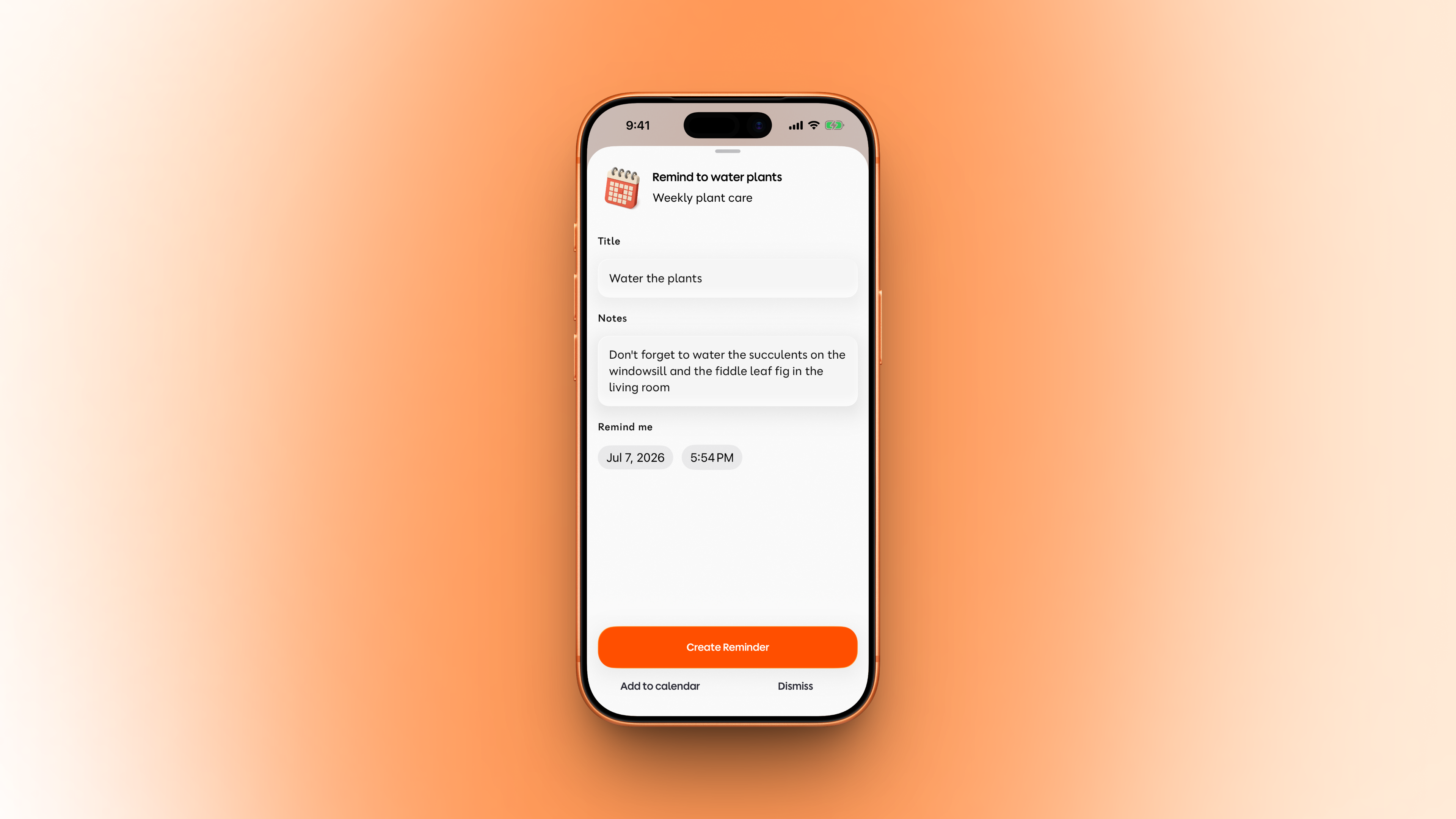
Poppy can create, edit, complete, or delete reminders. It can also create or cancel timers, and create or delete alarms where supported.
This is for the small things that usually live in your head for too long: water the plants, call someone back, start the timer, remember the thing after work.
Health and activity
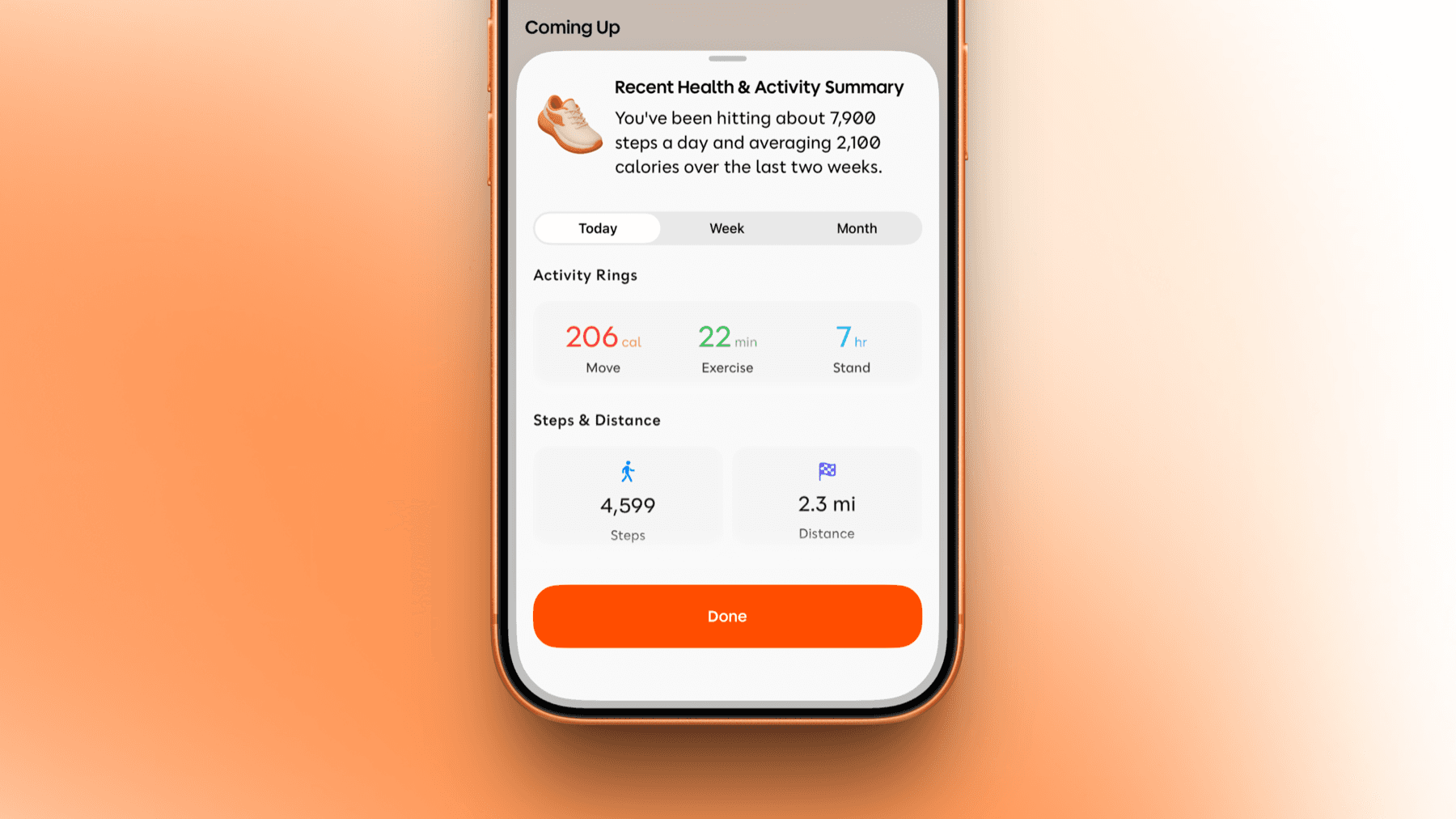
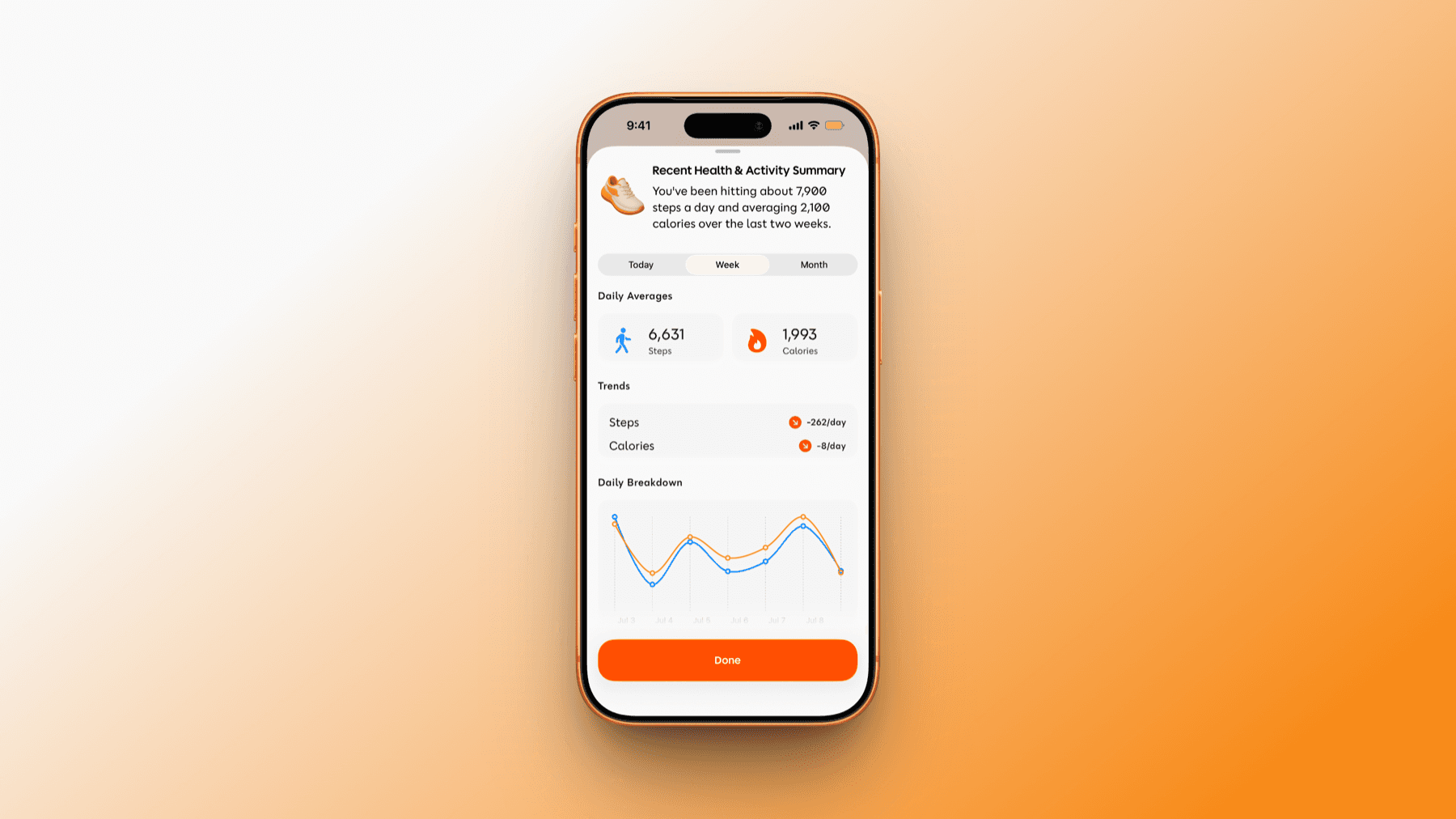
When Health is connected, Poppy can surface activity context like steps, calories, distance, and trends. It can show the summary inside your day, then let you review the details before moving on.
Music, home, and app handoffs
Poppy can also help with music, playlists, YouTube, links, tickets, HomeKit scenes, and other app handoffs when the right service is connected or installed.
Magic Cue - the right app when you need it
Magic Cue is the same idea, but outside Poppy. Bind it to the Action Button, or add it to Control Center. One press from anywhere on the device, and a sheet rises with the right destination - directions when a meeting is across town, your boarding pass at the airport gate, a ride when it is time to leave.
The in-app intro lays out the logic in three lines:
Reads your moment - calendar, location, device state, and more.
Picks the right app - Maps before a meeting. Music in the air. Slack when there is a thread waiting.
One press, you are in.
Magic Cue is part of Sprout and Bloom. Tier comparison in Pricing & access.

Smart Reminders
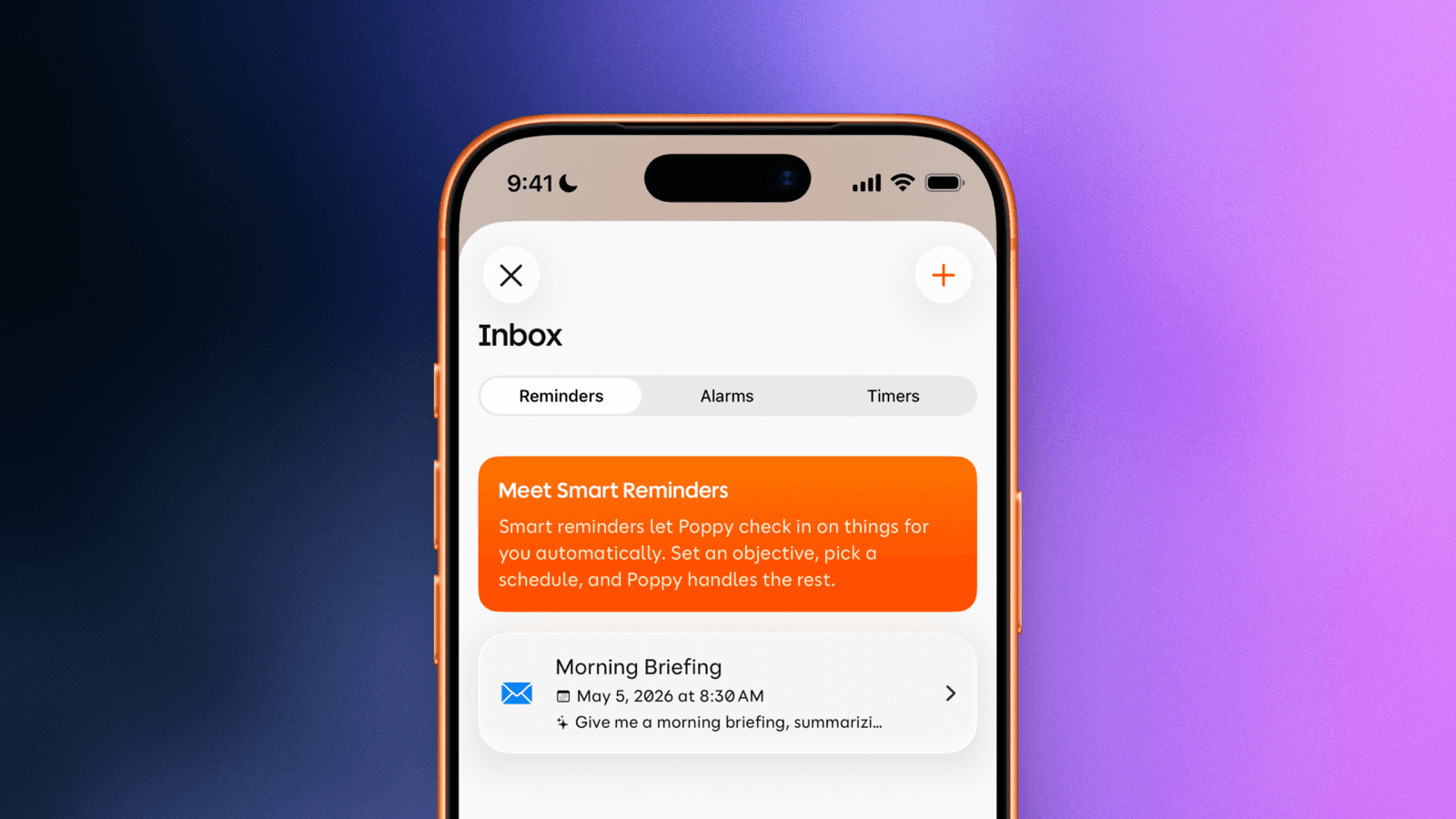
A Smart Reminder is three things in a single sentence: an objective, a schedule, and an action. "Every weekday at 8 AM, text me the first meeting and the day's weather." Set it once, and it runs on its own.
Three trigger types cover almost every case - recurring time, one-time, and location. The action can be any Shortcut in the library, or a custom Briefing in your own wording.
Every Smart Reminder lives on a single screen - pause one for the week, edit its schedule, or delete it outright. The point is not the automation; it is that once a routine is set, you do not ask Poppy for it twice.
Memories - what Poppy keeps
Poppy keeps memories as structured facts - short, named statements.
Vegetarian. Lives in Brooklyn. Sister's name is Anna. Usual coffee order is a small flat white. Not transcripts. Not raw messages. Facts can be inspected, edited, and removed. A pile of unstructured text cannot.
Memories live on a dedicated screen, grouped by category - people, places, preferences, routines. View. Edit. Delete. The three controls live on every memory card, with no second confirmation for deleting a single fact. Memory is what makes today's suggestions stand on yesterday's confirmations.
Text Poppy - iMessage and WhatsApp
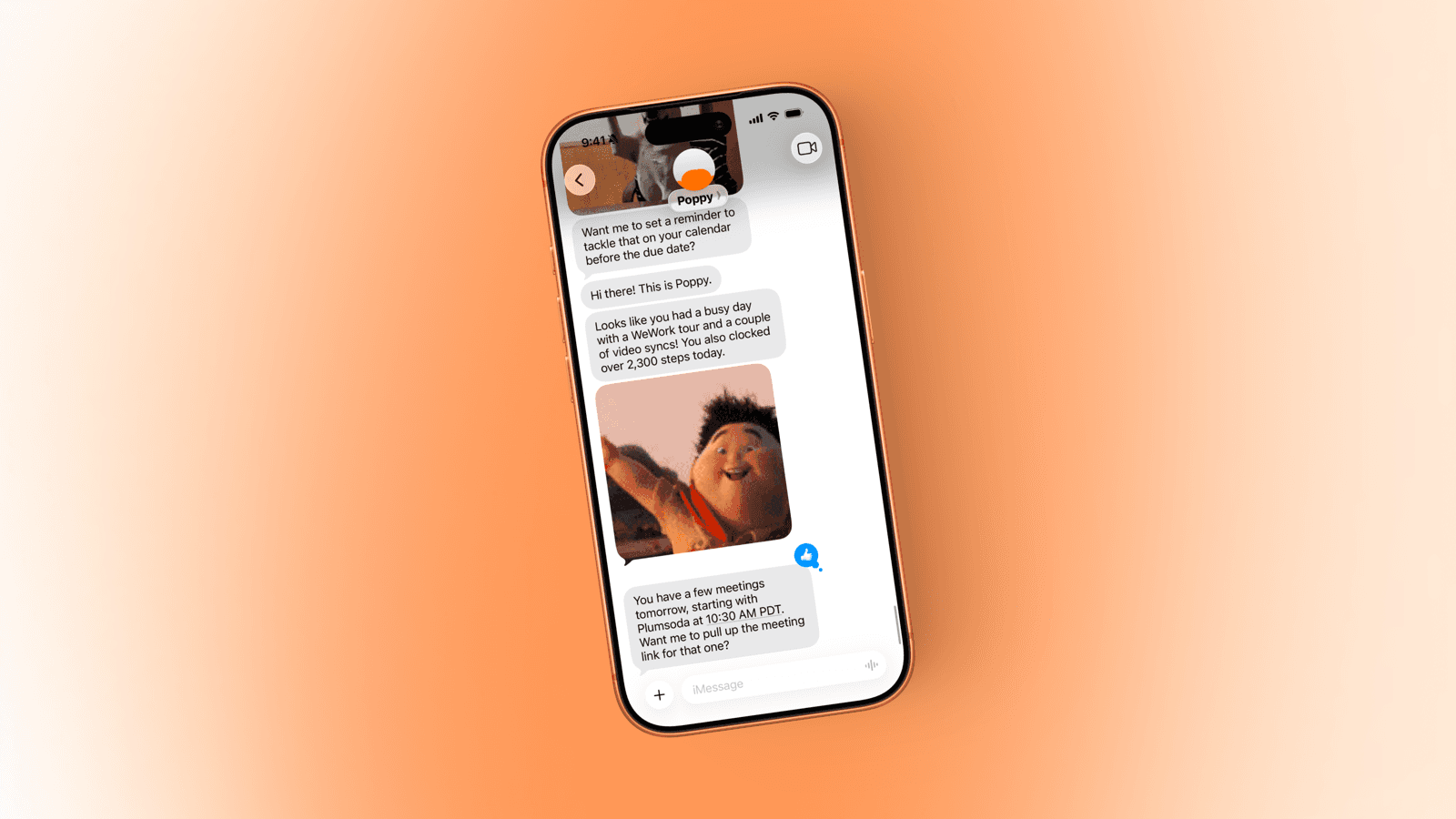
You do not have to open Poppy to use Poppy. Text it on iMessage or WhatsApp. "What is on my calendar?" "Remind me to call David at 4." "Any updates from Sarah?" Replies come back in the thread, often with the next action ready - a route, a draft, an RSVP, or a reminder.
The point is simple: Poppy can meet you in the messaging surfaces you already use, then bring the answer back to the app when a richer action needs confirmation.
A call from Poppy
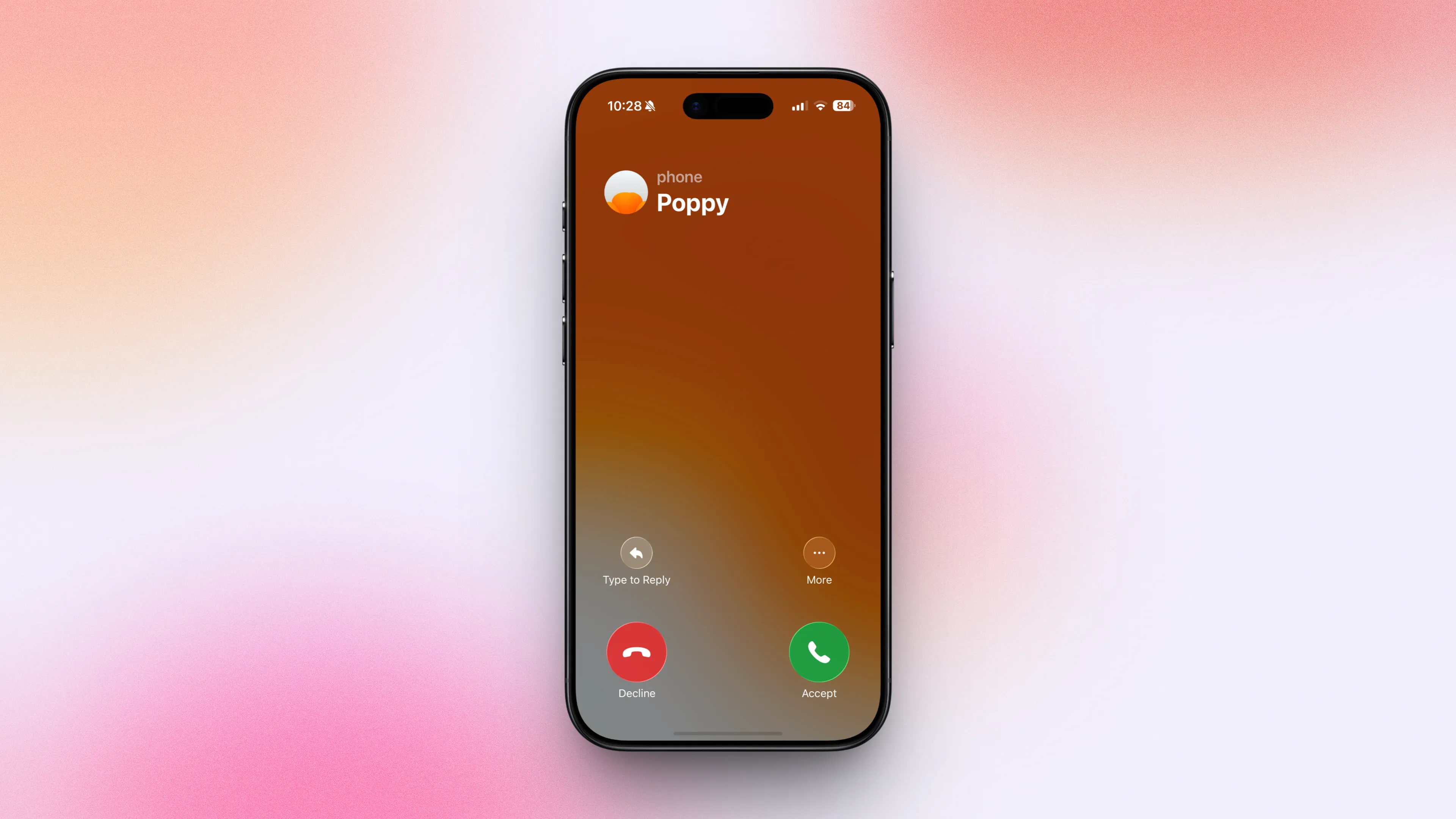
Some context is easier to hear than to read. A twenty-second voice summary beats a two-hundred-word card you are trying to read on the way out the door. For those moments - the morning rundown as you head to the car, a heads-up while your hands are full - Poppy can call you.
It comes through the standard iOS call surface, with the Poppy avatar as the caller ID, so it answers like any other call. You decide when. Call windows and frequency are set in your Profile, and any call can be muted in a single tap. The call is the last resort, not the default - Poppy reaches for it only when a glance will not do.
Widgets
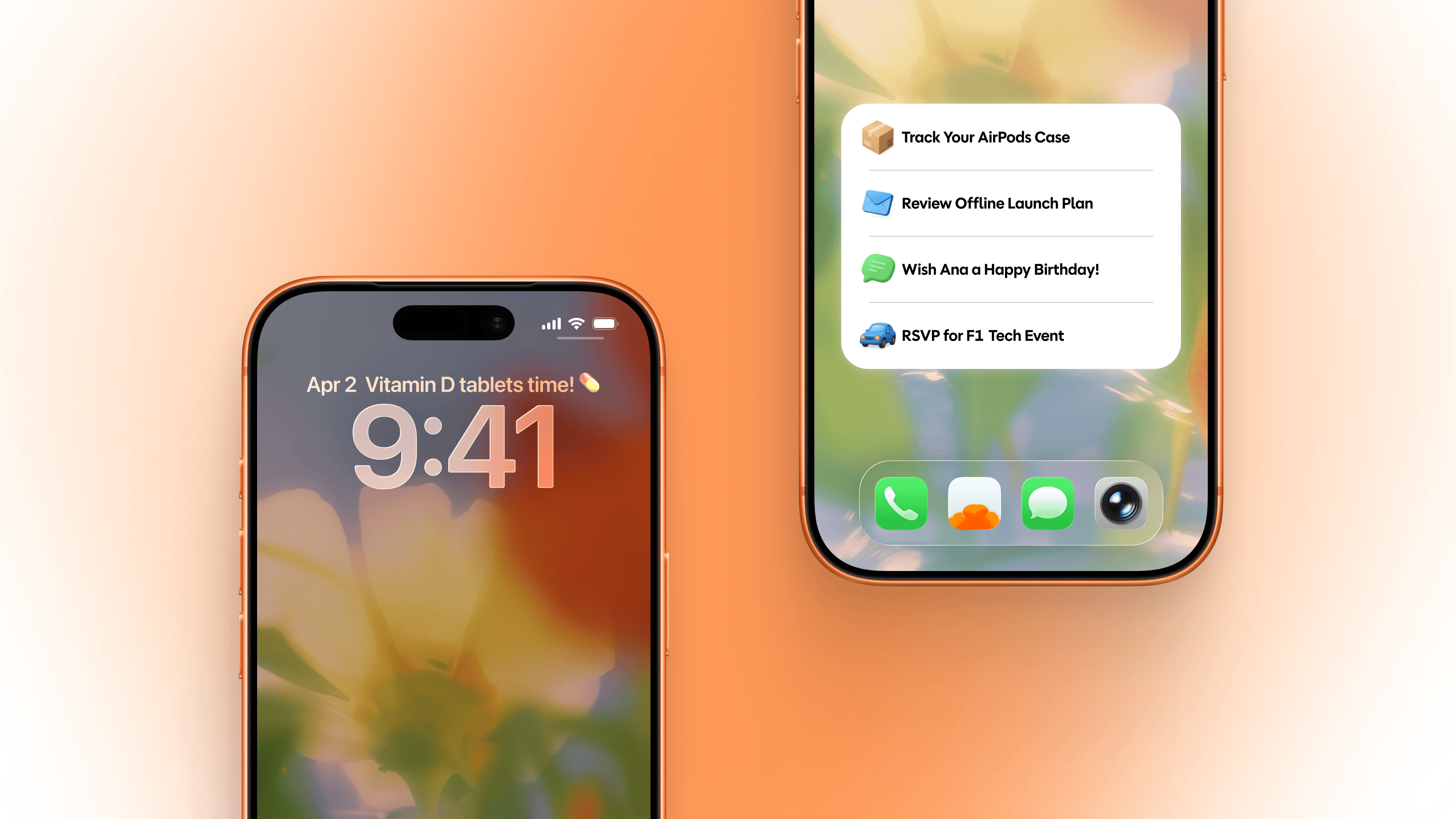
Three surfaces, on the parts of iOS where the eye already lives. The home-screen widget holds the top Shortcuts for the moment - four stacked rows, each a tap-to-act item, each launching into the action rather than the app. The lock-screen widget surfaces a single line above the clock - Vitamin D tablets time. Leave for the airport in fifteen. Sarah's birthday is tomorrow.
On Apple Watch, your top suggestion and count can live right on your wrist. When there is nothing to surface, they stay quiet. The best widget is one that does not need you to look at it.
Privacy, control, and what Poppy never does
Privacy is the part of a product like Poppy that has to be addressed in plain language. This chapter is the plain language.
What Poppy needs to work: Calendar, to know what is on today; Location and Notifications, to reach you at the right moment; and the services you opt into one by one, each with a clear prompt before access begins. Most integrations can be revoked from Profile, and full account deletion removes the full account context.
What Poppy never does
No passive listening. No always-on microphone. The only time Poppy listens is when you hold Push to Talk or accept a call.
No ambient recording of any kind.
No selling of your data, to anyone, for any purpose.
No advertising on top of your data.
No third-party sharing for marketing or analytics.
No action taken without your confirmation for anything sensitive - a message sent, an event created, a payment made, a booking placed.
What you control. The main controls live in Profile and Memories. In Profile, you can manage connected services, mute proactive channels, pause Smart Reminders, narrow calling windows, sign out, and clear local data. In Memories, structured facts are visible and deletable.
The model layer. Poppy uses a mix of cloud and on-device models, selected per task based on latency and quality. The product is model-agnostic by design - the underlying model handling a given step changes as better options arrive. The privacy commitments above are properties of Poppy as a product, not of any one model vendor.
Open Beta - where Poppy is today
Poppy is in Open Beta. The current App Store version is 0.7.4, released June 23, 2026. You can use it today, on the App Store, no waitlist.
A short list of the work in flight, with cadence as the commitment rather than dates: more integrations rolling in waves; deeper Google Workspace support; cross-account support for Bloom subscribers, with multiple email accounts in one Poppy.
Feedback in the app: Profile > Send Feedback. Bug reports get logged with the version automatically. Open Beta is a release stage, not a disclaimer - the label is honest about the cadence: frequent updates because Poppy is early.

Pricing & access
Three tiers, named for the growth metaphor that fits the product better than the usual Plus / Pro / Premium.
Free
Sprout ($8.99/mo or $79.99/yr): 1-week trial. Grow with Sprout.
Bloom ($15.99/mo or $149.99/yr): 1-month trial. Go All-In with Bloom.
What you unlock
Email Accounts: Free (1), Sprout (2), Bloom (Unlimited)
Push-to-Talk: Free (3/day), Sprout (10/day), Bloom (Unlimited)
Memory Facts: Free (10), Sprout (100), Bloom (Unlimited)
Refresh Frequency: Free (Hourly), Sprout/Bloom (30 min)
Magic Cue: Sprout/Bloom
Improved Suggestions: Sprout/Bloom
Daily Messages: Free (10/day), Sprout/Bloom (Unlimited)
Texting Poppy: Bloom adds video uploads; Sprout/Bloom add audio/file uploads.
Cancel from the App Store any time.
Free -> Sprout -> Bloom is a growth arc, not a generic feature ladder. The product gets more useful as it learns the routines, preferences, and contexts you choose to share.
FAQ
How does it work?
Poppy connects to the services you choose, reads the shape of your day, and turns that context into timely suggestions. It looks at your calendar, messages, email, location, reminders, and other opt-in sources, then surfaces what matters on the home screen, in widgets, or through text. You confirm sensitive actions before they happen, and you can inspect or delete what Poppy remembers at any time.
How is this different from Siri, or from a chatbot?
Siri waits for you to ask. A chatbot waits for you to ask. Poppy is designed to be more proactive: it connects to the services you choose, watches for useful context, and surfaces what matters before you go looking.
Is it listening to me through the microphone?
No. The only time Poppy uses the microphone is when you hold Push to Talk or accept a call. No passive listening, no ambient recording, no always-on hot word.
What apps does it work with?
Calendar (Apple, Google), email (Gmail, Outlook, iCloud), messaging (iMessage, WhatsApp), Apple Health, Reminders, Contacts, Google Workspace, Google Contacts, YouTube, Spotify, Apple Music, Home, Photos, Wallet, and more depending on what you choose to connect.
Beyond that, Magic Cue can hand you off to apps like Maps, Uber, Lyft, Zoom, Teams, Slack, airlines, hotels, Airbnb, DoorDash, Ticketmaster, music apps, payment apps, and more.
Does it learn about me? Can I see what it knows?
Yes, and yes. Poppy keeps structured facts in Memories - preferences, the people who matter, the places you go, the routines you have kept. Open the Memories screen and you see every fact. Tap to edit. Tap to delete.
Will it do things without asking me?
No, for anything sensitive - sending a message, creating an event, placing an order, making a payment. Poppy proposes the action and waits for your confirmation tap. The exception is Smart Reminders you have set yourself: those run on schedule, because you asked them to.
Do I need to connect everything?
No. The integrations are opt-in one by one. Coming Up works with Calendar alone; adding email and messages widens the picture; adding Health, Reminders, and other contexts widens it further.
How are you handling security?
The short version: OAuth for integrations that support it, secure token storage through iOS, encrypted transport, and user-controlled access. Most connected services can be managed from Profile, and full account deletion removes the full account context. We do not sell data and do not run advertising on top of it.
What models are you using?
A mix - some cloud, some on-device, chosen per task. Poppy is model-agnostic by design; the model layer changes as better options become available. The privacy commitments and the product surfaces above are stable regardless of which model handles a given step.
When can I get it? Is there a waitlist?
Poppy is in Open Beta. Available now on the App Store at downloadpoppy.com. No waitlist.
Is it free?
The Free tier is. Sprout is $8.99/month with a one-week trial; Bloom is $15.99/month with a one-month trial. Annual options save 26% on Sprout and 22% on Bloom. Cancel from the App Store any time.
Keep in touch
Download Poppy - downloadpoppy.com
Marketing site - getpoppy.app
Press & support - email sai@secondnaturecomputing.com, visit getpoppy.app, or use Profile > Send Feedback inside Poppy.
X (Twitter) - @poppysimplified
LinkedIn - Second Nature Computing
Instagram - @poppy.simplified
Wall of Love - Voices from the Poppy community
Press kit - Dropbox link
Less phone.
Stay up to date with us
© 2026 Second Nature Computing, Inc.